
Overview
In Report Builder version 2.8.0, we have added new functionality for building reports from Feature Layer Views, enabled the use of Metadata variables in widgets, and improved indicator and widget settings search. Alongside this, we have also addressed a number of key bugs.
Key enhancements
Metadata variables
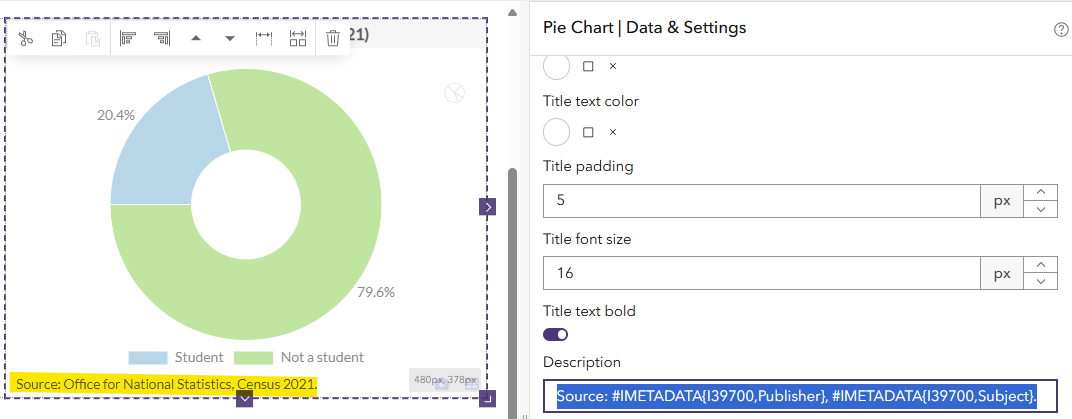
For reports created using a data catalog as a data source, it is now possible to use variables of the syntax #IMETADATA{<indicator-id>,<metadata-item>} to insert field values from a connected metadata table into text widgets or text-based widgets settings such as the Description of charts. For example, the variable #IMETADATA{I20695,Creator} returns the value of the Creator field from the metadata table for the indicator with the ID I20695. The advantage is that, should the metadata field value be updated in the metadata table, the displayed text in the report will reflect this change.
Minimum width for data labels
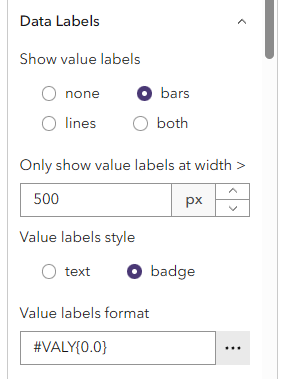
A new setting has been added to all bar, pyramid, line and scatterplot widgets allowing the administrator of the report to set a minimum widget width in pixels at which data labels should be displayed. This advanced setting is called Only show value labels at width > and will allow chart widgets to hide data labels on smaller screens where the labels might overlap each other or otherwise reduce the readability of the chart.
Reports based on feature layer views
It is now possible to base a report on a feature layer view to, for example, only show a subset of features from the original feature layer. Any data catalog or other feature layer added to the report as a data source would need to contain all features of the view but can contain additional features without those being displayed in the report.
Improved indicator and widget settings search
The search bar for finding widget settings or indicators has been combined and moved above the Data and Settings tabs. Depending on which tab is active, it will either search for indicators or widget settings. It works faster and returns more reliable results than its predecessors.

Improved performance when saving
To speed up the time it takes to save a report , Report Builder no longer saves a thumbnail of the report design by default. This setting can be re-enabled through the Editor Options dropdown:

Key bug fixes
- Pie Charts, Polar Charts and Scatter Charts now contain the option to display data labels as badges, bringing them into line with other chart widget types.
- Text Rules dialog: It is again possible to scroll the pop-up to select indicator values in the When clause
- Improved error message when trying to open a report that is not shared with the user
- Several smaller bug fixes for the new standard layout of the Pyramid Chart